

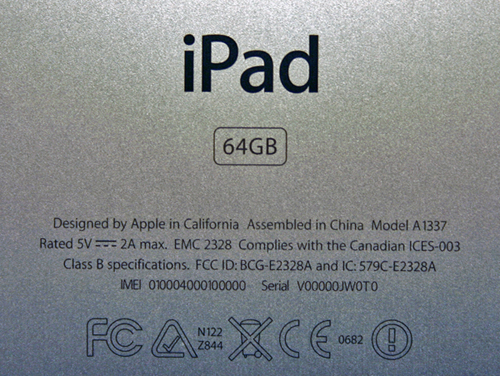
Apple products are admired worldwide for their elegance, innovation, and reliability. From iPhones to MacBooks and Apple Watches, the brand has become synonymous with quality and sophistication. Yet, hidden in plain sight on every device is a powerful tool that many users overlook: the serial number.
At first glance, a Apple serial number check may appear to be a random string of letters and numbers. But in reality, it’s a gateway to understanding your device’s history, authenticity, and value. By decoding it, you can instantly uncover details that Apple rarely highlights publicly. Here’s why every Apple user should know how to do it.
What Is an Apple Serial Number?
Every Apple device carries a unique serial number, assigned during manufacturing. This code functions like the device’s fingerprint—no two Apple products share the same one.
Apple uses serial numbers internally to track:
-
Model and configuration
-
Production date and location
-
Repairs, replacements, and warranty eligibility
-
Recalls and service program participation
For users, a serial number is much more than just a code—it’s a window into the device’s identity and past.
Why You Should Decode Your Apple Device
Many users ignore serial numbers, thinking they only matter for warranty checks. In reality, a serial number check can help you:
1. Confirm Authenticity
Counterfeit Apple devices are becoming increasingly sophisticated. Some fake iPhones, iPads, and Macs can trick even experienced buyers. A serial number check instantly verifies whether your device is genuine, helping you avoid scams and unnecessary losses.
2. Verify Warranty and AppleCare
Apple warranties vary based on purchase date and device type. By decoding your serial number, you can find out whether your device is covered under Apple’s limited warranty or AppleCare, and when coverage expires. This ensures you’re not caught off guard if something goes wrong.
3. Detect Refurbished or Replacement Devices
Some Apple devices have undergone repairs, replacements, or refurbishments. While these units are often perfectly functional, knowing the device’s history is crucial for resale value or personal expectations. Serial number decoding provides transparency, showing whether your device is brand new, replaced, or refurbished.
4. Learn Manufacturing Details
Your device’s serial number can reveal subtle production information, including the factory where it was assembled and the exact week of manufacture. This insight is especially useful for collectors, enthusiasts, or anyone comparing different production batches.
How to Decode Your Apple Device
Decoding an Apple serial number is simpler than it sounds:
-
Locate the serial number:
-
iPhone/iPad: Settings > General > About
-
MacBook: Apple menu > About This Mac > Overview
-
Apple Watch: Watch app > General > About
-
Physical engraving: Many devices have the serial number printed on the back or underside
-
-
Check with Apple or trusted verification tools: Input the serial number to view details such as model, production date, and warranty status.
-
Compare the information: Ensure the results match the physical device in terms of model, color, and storage capacity. Any discrepancy is a warning sign.
Benefits of Decoding Your Device Instantly
Spot Counterfeits Quickly
By verifying a device’s serial number, you can immediately detect fake or cloned products. This is particularly useful when purchasing used devices or deals that seem too good to be true.
Understand Device History
Serial numbers track repairs, replacements, and refurbishments. Knowing this history allows you to make informed decisions about usage, resale, or upgrades.
Protect Yourself from Scams
Decoding your device’s serial number gives you a layer of protection when buying from online marketplaces or individual sellers. It helps ensure the device is authentic, legal, and matches the seller’s description.
Gain Insider Knowledge
For tech enthusiasts, serial number decoding offers fun and valuable insights. Learning where your device was made, when it was produced, and whether it’s part of a particular batch can add context to your Apple experience.
Tips for Apple Users
-
Always check before buying used devices: Even a visually perfect iPhone can hide issues if its serial number reveals inconsistencies.
-
Keep a record of your serial number: It’s useful for warranty claims, insurance, or recovery if the device is lost or stolen.
-
Combine with physical inspection: Serial number checks are powerful, but examining the device for wear or mismatched parts adds another layer of confidence.
-
Be cautious of deals that seem too good to be true: A quick serial number check can save you from falling into scams.
Final Thoughts
Apple serial numbers are much more than a technical code—they’re a window into your device’s identity. By decoding your serial number instantly, you can confirm authenticity, uncover hidden history, verify warranty coverage, and protect yourself from scams.
Whether you’re a first-time Apple user or a seasoned enthusiast, understanding your device through its serial number gives you control, clarity, and confidence. It’s a small step that ensures you know exactly what you own and protects the investment you’ve made in one of the most coveted tech brands in the world.
Decoding your Apple device isn’t just smart—it’s essential. And with a few minutes of attention, you can uncover the truth behind your Apple device instantly.

Leave a Reply